
If your site is fast, you can log in to it, and you own it, fix the words, photos and buttons. If it’s slow, built on a platform you can’t control, or nobody has the login, a fresh build is often cheaper than patching. Either way, find your domain login first.
Fix it or start over? Answer these in order
Fix it or start over: the detailed test
| If this is true | Lean toward |
|---|---|
| It loads fast on a phone and you can log in to edit it | Fix it. Update the words, photos and buttons. |
| The problems are old info: hours, prices, photos, a dead link | Fix it. Often a one-afternoon job. |
| It’s slow on a phone, or the layout breaks on small screens | It depends. Huge photos are an easy fix. If the template or platform is the cause, start over. |
| Nobody has the login, or the person who built it is gone | Start over, once you’ve secured your domain. |
| It’s on a builder template you’ve outgrown | Start over. Wix says you can’t switch an existing site to a new template. |
| It looks ten years old | Start over. A new design on old bones still feels old. |
Think of it like a house. New paint and fixtures make sense when the foundation is solid. When the foundation is the problem, every repair costs more than it should, and the house still isn’t right.
Signs your website is costing you customers
An outdated site isn’t just a looks problem. In DreamHost’s 2026 survey of U.S. consumers, 69% said a local business needs a website to seem credible. A site that looks abandoned sends the opposite message: if they don’t keep their website up, do they keep their promises?
What customers see on an old site
Thank you for visiting. We are a family owned business serving the area since 1998. Please call for more information about our many services and specials.
Holiday Special! Valid through December 2019.
Best viewed in Internet Explorer.
What a modern site looks like
- Old hours, a past holiday special, or a copyright year from years ago
- Tiny text you have to pinch and zoom to read on a phone
- No tap-to-call button
- Photos that are blurry, stretched, or all stock
- It takes more than three seconds to load on cell data
- Your services, prices or service area have changed and the site never caught up
Google Analytics data published by Google found 53% of mobile visitors leave a page that takes longer than three seconds to load. More on that in why is my website so slow?
What “fixing” usually means
If your site passes the test above, a fix is often a short list:
- Update the facts
Hours, prices, services, service area, phone number and the copyright year.
- Put a tap-to-call button at the top
The single most useful change for most local businesses.
- Replace weak photos
Bright, recent photos of your real work. Resized so they load fast.
- Rewrite the top of the homepage
One clear line: what you do and where. Then one button: call, book or get a quote.
- Check it on your phone
On cell data, not Wi-Fi. Tap every button.
Before you call anyone, gather these
- Your domain login. Where your web address is registered (GoDaddy, Namecheap, Squarespace, and so on) and how to sign in. This is the one thing you can’t skip.
- Where it’s hosted, if you know. Wix, Squarespace, WordPress, or “my nephew set it up.”
- Your best photos of real work, your team and your place.
- A short list of what’s wrong and what you want people to do on the site: call, book, get a quote.
- Your Google Business Profile login, so the new site can be linked from it.
If you can’t find the domain login, start with ICANN’s free lookup tool (lookup.icann.org). It shows which company holds your domain, and that company can help you get access.
Questions to ask a designer about a redesign
- “Will my domain and email stay the same?” They should, and your email shouldn’t go down during the switch.
- “What happens to my old pages?” Important ones should keep their address or redirect to the new page.
- “Can I see the new design before the old site comes down?” The new site should be finished and checked before it replaces the old one.
- “Who owns the new site?” You should, along with a copy of the files.
Will I lose my Google ranking if I start over?
Not if it’s done carefully. The things that matter most:
- Keep the same domain. Your web address carries your history with Google.
- Keep or redirect important pages. If an old page like /services/ gets visits, the new site should have the same address or send visitors to the new one automatically.
- Tell Google. Submit the new sitemap in Google Search Console after launch, and keep your Google Business Profile pointing to the site.
What a redesign usually costs
A redesign is usually priced like a new site, because most of the work is the same. My price is the same either way: $490 one time. The full breakdown is in how much a small business website costs.
See the new version before you decide
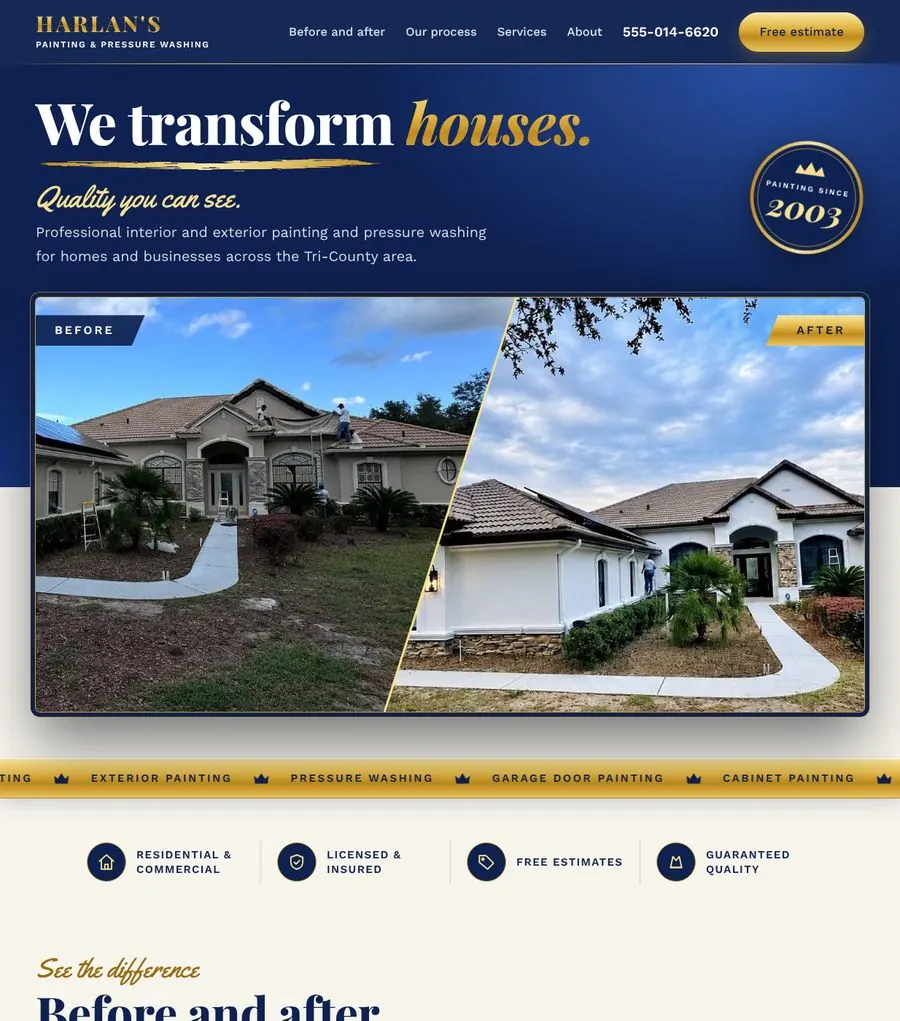
The hardest part of fixing an old site is imagining the new one. So I build a free sample of your new site from your current photos and services. You compare old and new side by side, like the example above. If you love it, it’s live in 72 hours after you approve, at the same web address, so your customers and Google find the new one.
Quick answers
Will I lose my Google ranking if I redesign my website?
Not if it’s done carefully. Keep the same domain, keep or redirect your important page addresses, and resubmit your sitemap in Google Search Console after launch.
Can I keep my domain name if I get a new website?
Yes. Your domain is separate from your website. The new site is pointed to the same web address, so customers find it exactly where they always have.
How much does it cost to fix a website?
Small fixes like new hours, photos or a phone button can be a quick job. A full redesign usually costs about the same as a new site.
How do I know if my website is outdated?
Old dates or specials, tiny text on phones, no tap-to-call button, slow loading on cell data, and photos that are blurry or stretched are the most common signs.
Can I move my website off Wix or Squarespace?
You can keep your domain and move it to a new site. The design itself usually can’t be exported, so moving off a builder generally means rebuilding the site.
How long does a website redesign take?
About as long as a new site. A simple fix can take an afternoon; a full redesign can take weeks with a freelancer, or 72 hours after approval with my free-sample process.
In the Tampa Bay area? See website design in Tampa, St. Pete, Clearwater, Spring Hill and New Port Richey.